• Free Delivery Islandwide

  • 2-year warranty

  • 7-day returns

  • Sign up and save

0

Shopping cart

There are currently no items in your shopping cart.

    Philips Support

    The filter of my Philips Juicer is blocked

    Published on 2022-03-08
    If the filter of your Philips Juicer is blocked, please read our troubleshooting advice below.

    The filter needs to be cleaned

    If you want to clean the filter, switch off your Philips Juicer first. After that, clean the feeding tube (marked with 5 on the image below) and the filter (marked with 3 on the image below) of the appliance. Once you finish with cleaning, process smaller quantity of fruits and/or vegetables.

    Did this step not solve the issue? Please contact us for further assistance.
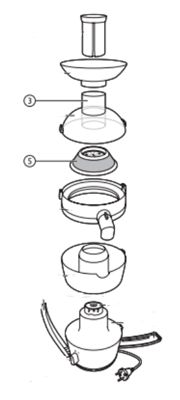
    The filter of Philips Juicer

    The information on this page applies to the following models: HR1858/50 , HR1855/31 , HR1832/00 , HR1836/00 , HR1811/71 , HR1871/15 , HR1855/00 , HR1863/00 , HR1871/10 , HR1847/00 , HR1869/00 , HR1823/70 , HR1871/00 , HR1865/00 , HR1821/70 , HR1858/55 , HR1810/70 , HR1843/55 , HR1858/00 , HR1861/00 , HR1841/80 , HR1851/00 , HR1821/10 , HR1843/00 . Click here to show more product numbers Click here to show less product numbers

    Looking for something else?

    Discover all Philips Support options

    You are about to visit a Philips global content page

    Continue

    Our site can best be viewed with the latest version of Microsoft Edge, Google Chrome or Firefox.