If your Philips epilator is not removing your body hair completely, follow our tips to improve the performance of your device or watch the video below on how to properly use your epilator.
My Philips Epilator does not remove hair properly
Published on 18 February 2026
Play Pause
Pre-trim your hair
The optimal hair length for epilating is 3 - 4 mm. If your hair is longer than that, use the trimming attachment of your epilator to shorten the length of your hair. If your epilator does not come with a trimming comb, shave your hair and then wait for 7 days for the hair to grow long enough to be epilated.
Stretch your skin
While epilating, stretch the skin and move the epilating head slowly over the skin, allowing the discs to catch the hair. For best results, move the appliance against the direction of hair growth while ensuring the head is in complete contact with the skin.
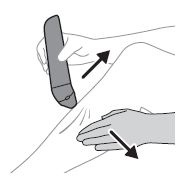
Hold the epilator at the right angle
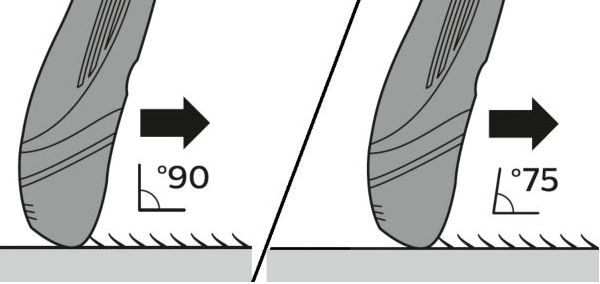
For your epilator to remove your hair properly, its important to hold it at the right angle.
For our corded epilators, it is best to hold the epilator upright at a 90° angle to your skin. For those that are used cordless, it is better to hold the epilator a bit tilted at a 75° angle. For more detailed usage instructions, please check the user manual of your epilator model.
Move the epilating head slowly over the skin while epilating, to allow the discs to catch the hair. For the best result, move the appliance against the direction of hair growth, making sure the head is in full contact with the skin.
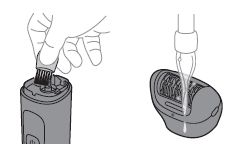
Clean the epilator
Before using your epilator, always inspect its head to make sure it looks clean. If you see some hair or debris stuck in the epilating discs of the epilator remove them and wash the head before use. Also make sure your skin is clean and dry before epilating.
Play Pause
Need more support?
If you have tried the tips above and are still not satisfied with the results of your Philips epilator, then please contact us.

