Before using your Philips AquaTrio Cordless for the first time, follow the steps in this article and/or watch our videos.
The information below only applies to AquaTrio 7000 and 9000 series models (not to AquaTrio and AquaTrio Pro). See the image below.
How to assemble my Philips AquaTrio Vacuum Cleaner?
Published on 29 September 2023
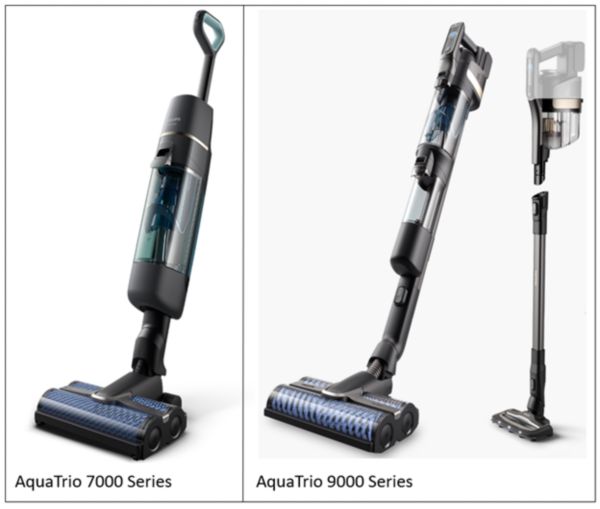
1. AquaTrio 7000 Series
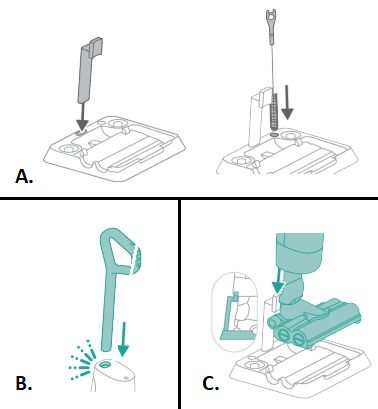
- You can assemble the station by clicking the appliance holder into the baseplate, where you can also store the cleaning brush (see image A).
- To assemble the appliance, insert the handle into the appliance (see image B).
- To store the appliance, you can place it in the After-Clean & Storage station by sliding the appliance on the holder so that the end of the appliance holder sticks into the appliance (see image C).
Watch our video below for step-by-step instructions about how to assemble your appliance:
2.1 Aquatrio 9000 Series After-Clean and Storage station
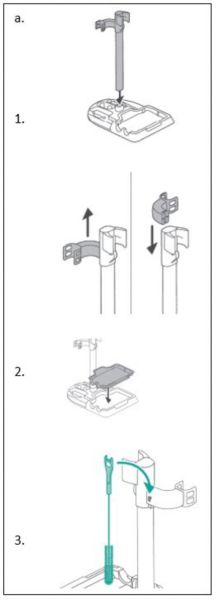
1. Click the appliance holder of your Philips AquaTrio 9000 series Vacuum Cleaner into the After-Clean tray and connect the position holder to the tube.
2. Please make sure that the After-clean tray is placed in the after clean and storage station.
Tip: You can hang the cleaning brush on the hook of the appliance holder.
2. Please make sure that the After-clean tray is placed in the after clean and storage station.
Tip: You can hang the cleaning brush on the hook of the appliance holder.
2.2 Aquatrio 9000 Series Vacuum only set-up
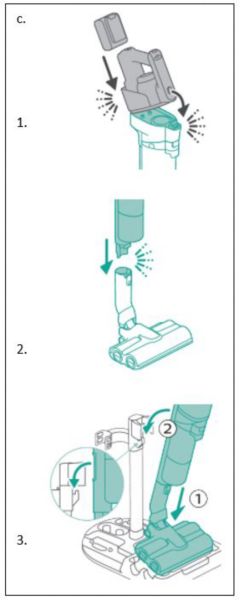
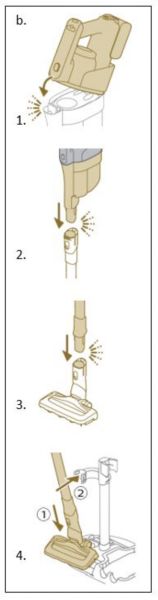
1. Attach the 3-in-1 handheld to the dust bucket ('click').
2. Attach the dust bucket to the tube ('click').
3. Insert the tube into the LED nozzle.
4. To store the vacuum only set-up, place the vacuum only set-up in the after-clean and storage station by first placing the LED nozzle onto the long side of the baseplate and then pressing the tube into the holder.
2. Attach the dust bucket to the tube ('click').
3. Insert the tube into the LED nozzle.
4. To store the vacuum only set-up, place the vacuum only set-up in the after-clean and storage station by first placing the LED nozzle onto the long side of the baseplate and then pressing the tube into the holder.
2.3 Aquatrio 9000 Series Vacuum & mop appliance
1. To assemble the Vacuum and Mop set-up, attach the 3-in-1 handheld to the wet module ('click').
2. Attach the wet module to the AquaSpin nozzle ('click').
3. To store the Vacuum and Mop set-up, you can place it in the after-clean and storage station.
Note: It is not possible to store the Vacuum and Mop set-up on the wall-mount. It is only possible to store the Vacuum only set-up on the wall-mount.
2. Attach the wet module to the AquaSpin nozzle ('click').
3. To store the Vacuum and Mop set-up, you can place it in the after-clean and storage station.
Note: It is not possible to store the Vacuum and Mop set-up on the wall-mount. It is only possible to store the Vacuum only set-up on the wall-mount.