To find out how to clean the dust bucket, filter, brush, and water tank of your Philips 2000/3000 Series Cordless Vacuum Cleaner, check out the sections below. You can find the model name of the stick and/or check the image below.
How to clean my Philips 3000/2000 Series Cordless Vacuum Cleaner
Published on 10 October 2024
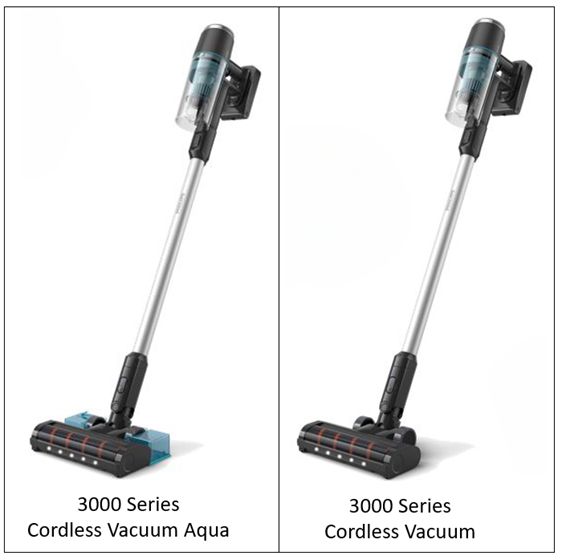
Dust Bucket
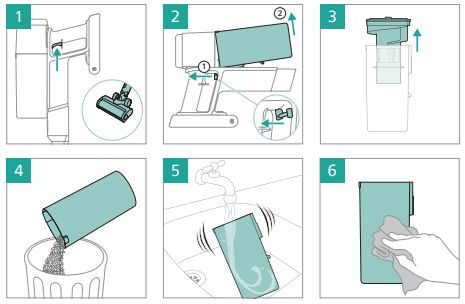
To clean the dust bucket of your Philips Cordless Vacuum Cleaner, follow these simple steps:
- Turn off the appliance (image 1).
- Remove the bucket by pulling the lever, located on the right side of the power button (image 2).
- Lift the colored part to access the bucket (image 3).
- Empty the dust bucket (image 4).
- To maintain the appliance thoroughly, rinse the dust bucket under the tap. Please, avoid using the dishwasher (image 5).
- Ensure the dust bucket is completely dry (24 hours) before placing it back (image 6).
Play Pause
Filter
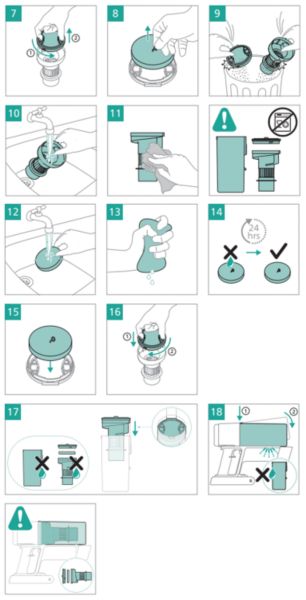
To keep your Philips Cordless Vacuum Cleaner performing at its best, make sure to clean the filter regularly. Follow these simple steps:
- After removing the colored part from the bucket, take out the filter case by rotating it counterclockwise (image 7).
- Separate the foam filter from the filter case (image 8).
- Tap the foam filter and the filter case over a trash bin to clean (image 9).
- Rinse the colored part under the tap (image 10) and dry with a cloth (image 11).
- Rinse the foam filter (image 12) and squeeze it until clean water comes out (image 13). Remember not to rinse the filter case.
- Wait 24 hours until the foam filter is fully dried (image 14).
- Reassemble the parts (images 15-18).
Play Pause
Brush
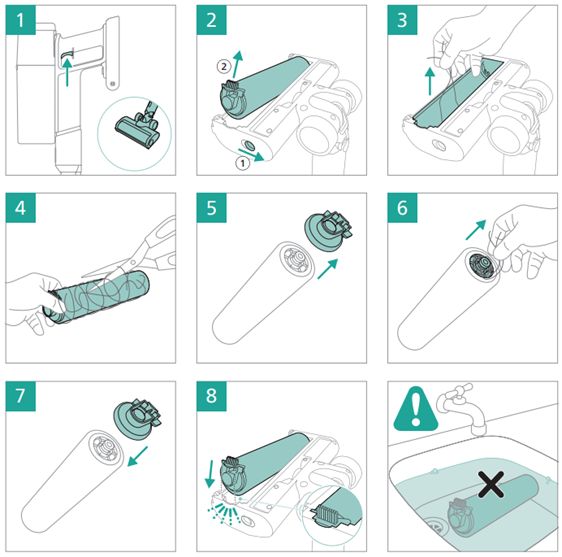
Your Philips Cordless Vacuum Cleaner has a rotating brush located inside the nozzle. This brush can become clogged with hair and needs regular maintenance. Please follow the steps below and refer to the video for more information:
- Switch off the power (image 1).
- Remove the brush while holding the button to the right (image 2).
- Remove all visible pollution by hand (image 3)
- Cut and remove any tangled hairs from the brush (image 4).
- Remove the side cap (image 5) and remove hairs in between (image 6).
- Insert the brush back in place, and your vacuum is ready to use (images 7-8).
Play Pause
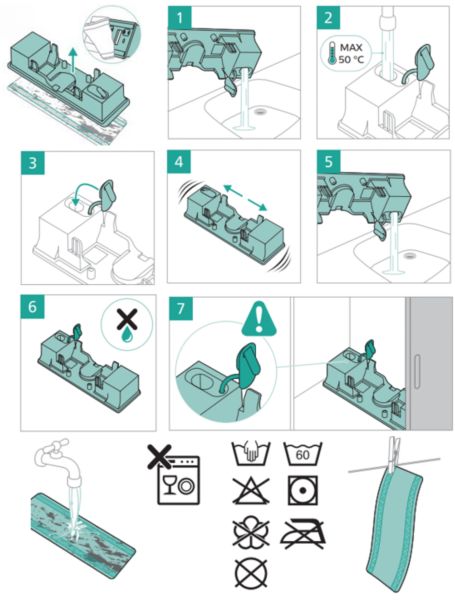
Water Tank (Aqua model only)
To keep your Aqua nozzle in good condition, we suggest following these easy steps for cleaning and drying after each use. Refer to the video for more information:
We recommend replacing the cloth every 6 months (accessory XV1630).
Note: The water tank in the video looks slightly different from your water tank, but the cleaning method is the same (1:36-1:46).
- Remove the cloth from the water tank.
- Empty the water tank (image 1).
- Clean the water tank under the tap and shake it gently (images 2-5).
- Let the water tank dry and clean the cloth by rinsing it or putting it into the washing machine (images 6-7).
We recommend replacing the cloth every 6 months (accessory XV1630).
Note: The water tank in the video looks slightly different from your water tank, but the cleaning method is the same (1:36-1:46).
Play Pause

