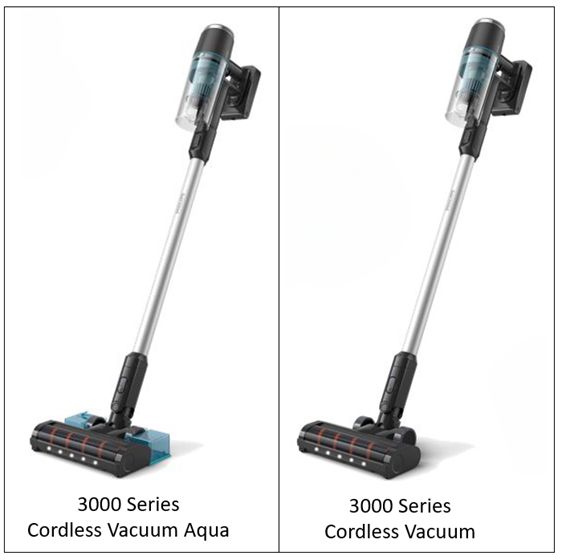
If the suction power of your Philips 3000 or 2000 Series Cordless Vacuum Cleaner is not as good as expected, find possible causes and solutions below.
My Philips 3000/2000 Series Cordless Vacuum has low suction power
Published on 10 October 2024
The filter and/or the cyclone are dirty
If the filter and/or cyclone (colored part in the dust bucket) are dirty you will notice that the suction power will decrease. To solve this, follow these steps to clean both parts:
Dust bucket/cyclone
Filter
Dust bucket/cyclone
- Turn off the appliance (image 1).
- Remove the bucket by pulling the lever, located in the right side of the power button (image 2).
- Lift the colored part to access the bucket (image 3).
- Empty the dust bucket (image 4).
- To maintain the appliance thoroughly, rinse the dust bucket under the tap. Please, avoid using the dishwasher (image 5).
- Ensure the dust bucket is completely dry before placing it back (image 6).
Filter
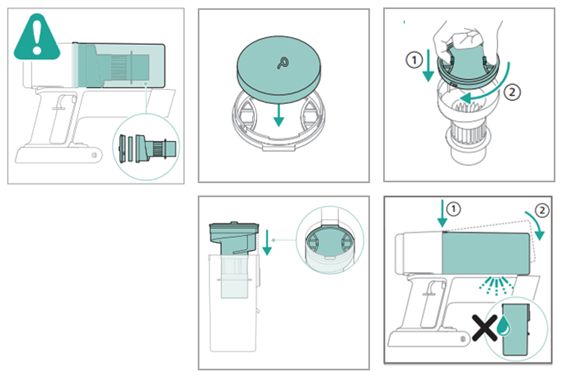
- After removing the colored part from the bucket, take out the filter case by rotating it counterclockwise (image 7).
- Separate the foam filter from the filter case (image 8).
- Tap the foam filter and the filter case over a trash bin to clean (image 9).
- Rinse the colored part under the tap (image 10) and dry with a cloth (image 11).
- Rinse the foam filter (image 12) and squeeze it until clean water comes out (image 13). Remember not to rinse the filter case.
- Wait until the foam filter is fully dried (image 14).
- Reassemble the parts (images 15-18).
- Note: for optimal performance, we recommend cleaning the filter of your vacuum cleaner monthly and replacing the filter every 6 months (Accessory XV1631).


A foreign object is stuck in the nozzle
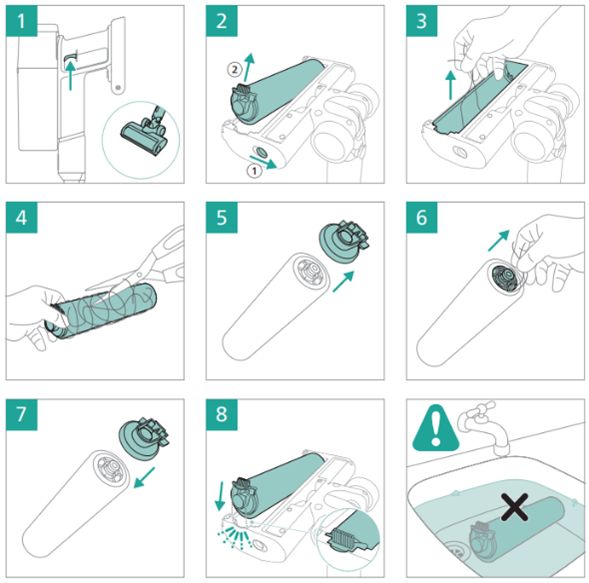
If a foreign object is stuck in your appliance, it could cause problems with suction power. Ensure the appliance is switched off (image 1). Clean the nozzle by removing the tube from the main appliance and check if something is stuck in the tube and the part of the nozzle that was connected to the tube. If you find no blockages, follow the instructions below to clean the nozzle and brush:
- Remove the brush while holding the button on the side (image 2).
- Remove all visible pollution by hand (image 3)
- Cut and remove any tangled hairs from the brush (image 4).
- Remove the side cap (image 5) and remove hairs in between (image 6).
- Insert the brush back in place, and your vacuum is ready to use (images 7-8).
Play Pause
The dust container is not attached properly to the appliance
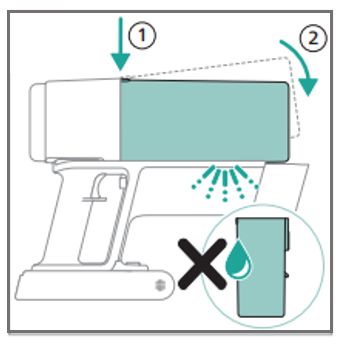
If the dust bucket is not attached properly, it could cause problems with suction power. Make sure the dust bucket is attached properly by first aligning the top side of the bucket before hinging it in place.
Play Pause
The filter is not placed in the appliance
If the filter is not present in the appliance, this can cause problems with suction power. Please make sure that the filter is in the appliance and assembled correctly. When you connect the dust bucket to the appliance it is important to first align the top side of the bucket before hinging it in place (see image below).
If you have checked the above and the appliance still has a lower suction power than usual, please take it to a Philips service center or contact us for further assistance at www.philips.com/support.
If you have checked the above and the appliance still has a lower suction power than usual, please take it to a Philips service center or contact us for further assistance at www.philips.com/support.